Showing posts with label Desktop. Show all posts

Sunday, August 22, 2010

Christmas Countdown Gadget for Your Windows Desktop 13-11

TheChristmas and Winter Holidays are approaching fast, and if you want tosee how many days are left until Christmas, I have created thiscountdown gadget. This should work on any Windows desktop, includingWindows 7. It requires no other software

Free Download Now

Free Screen Recorder – An Easy-to-Use Desktop Recording Program

Free Screen Recorder is a smart, reliable and easy-to-use screen recording programto capture screen activities and sounds to standard AVI video file. If you move the cursor, launch a program, type some text, click buttons, select some menus – anything you see on the screen – Free Screen Recorder will record all these, and sound from your system microphone.

Free Screen Recorder


You can choose the output AVI file’s video codec, framerate, audio codec, frequency; You can choose the cursor’s display, to be actual cursor or custom one as you like, and you can add highlight to it. Record any part of the screen or even the entire desktop, with just a few clicks, or custom hotkeys.

Free Screen Recorder is an ideal tool to make software demonstrations, develop videos for training and tutoring. Have fun with it!

Here are some key features of “Free Screen Recorder”:


· Records anything you see on your screen.
· Records sound from your microphone.
· Supports hotkey to start, pause, stop recording.
· Capture any part of the screen, even the entire desktop.
· Choose output video codec, framerate, audio codec, frequency.
· Mouse cursor recording can be turned on or off, true shape of the cursor is recorded.
· Show flashing rectangle when screen recording.
· Easy to use and user-friendly interface.

Requirements:

· Minimum: Pentium II 233 PC or higher, 32MB RAM or more.
· Recommend: Pentium III 450 PC or higher, 64MB RAM or more.

Free Screen Recorder

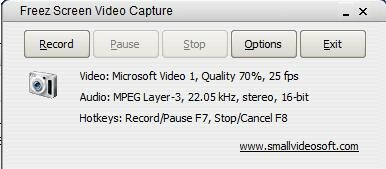
Freez Screen Video Capture – Recording Tool To Record Screen Activities


Freez Screen Video Capture was designed to be a screen-capture & screen-recording tool to record screen activities and sounds into standard AVI video files.

You can record any part of the screen’s activities and the cursor’s movements, using a microphone to narrate your screen recordings.


You can choose the output video’s compressor (such as Microsoft Video 1, MPEG-4, DivX…), quality, framerate, audio format (such as PCM, ADPCM, MP3, OGG…), and volumn. You can also start, pause, and stop screen recording with hotkeys.

Use Freez Screen Video Capture to create screen demos, training videos, animated tutorials, animated presentations etc. Enjoy it!

Here are some key features of “Freez Screen Video Capture:

· Start, pause, stop screen recording with user-defined hotkeys.
· Record screen activities into Standard or Compressed AVI video files.
· Record any region of the screen.
· Record Screen in any screen color depth.
· Supports sound recording from microphone, videotape, Internet, etc.
· Select the video encoder for your screen recording output AVI file.
· Adjustable screen capture framerate, output AVI video quality.
· Set the sound recording format and compressed audio format.
· Can record Actual Cursor on the screen.
· User-friendly interface, easy to use.
· Free to use and register.

Free Download

Click here to Download and Donate $0.001 for the website (Firefox only)

Gladinet Cloud Desktop

Map Cloud Storage as a Network Drive

Map cloud storage as a virtual network drive
Works just like a local drive on your computer
Manage and use cloud storage with Windows® Explorer
Protect your online credentials with profile encryption*

Upgrade Explorer to a Storage Portal

Manage and use cloud storage with Windows® Explorer
Open platform supports all major providers
Drag & drop to transfer files between different storage services
Backup to multiple storage services for peace of mind

Backup Pictures, Music, Videos and More Online

Incremental backup to one or more cloud storage services
Backup based on folders or file type
Backup Google Docs™ to local and/or cloud storage

Enjoy Lightning Fast File Transfers

Manage tasks with a versatile and powerful task manager
Enjoy enterprise level scalability for large transfers
Transfer files upto 10x faster with advanced acceleration technology

Disclaimer:

*The login credentials for cloud storages and services are stored in user's local PC or in memory. Gladinet does not collect them. They are used only when connecting to cloud services.
Gladinet is an independent and open platform to deliver and integrate web services into your desktop operating system.
All the integrations are done by using public information or open APIs available to any independent developers.
Gladinet is not affiliated with, nor endorsed by respective companies.
Cloud Desktop is a trademark of Gladinet, Inc.

Download Now